Inventory management
Track products, quantities and stock movements from your local workspace.
- Live quantity updates
- Low-stock alerts
- Warehouse movements

Offline business software
Manage inventory, sales, customers and invoices from one desktop app—even when your internet connection is unavailable.
30-day free trial
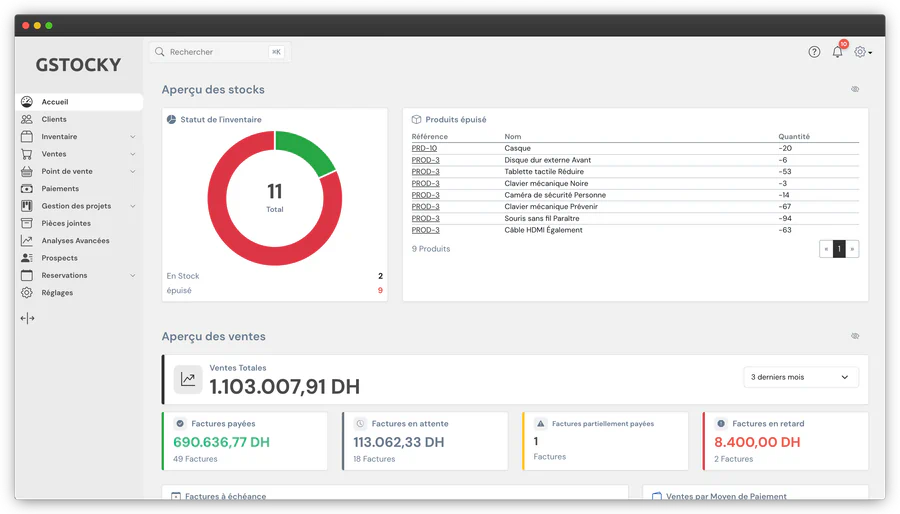
Core features
The tools your team uses most stay available inside your shop, warehouse or office.
Track products, quantities and stock movements from your local workspace.
Record sales and returns without waiting for an external network connection.
Create business documents and keep a clear local customer history.
Local by design
GStocky Desktop Offline is installed around your business environment. Use it on one computer or configure it for a private local network with multiple workstations.
A straightforward setup for a small shop, office or counter.
Connect users and POS stations inside the same location.
Keep backup routines aligned with your own operating rules.
Start your trial
Choose your installer and use the complete desktop app free for 30 days. Contact us when you are ready to activate your license.
Frequently asked questions
Yes. GStocky Desktop Offline runs its core inventory, sales and invoicing operations locally, so your team can continue working when an internet connection is unavailable.
GStocky Desktop Offline is available for Windows 64-bit computers and Mac computers with Apple silicon.
You can manage products, stock quantities, sales, returns, customers, invoices, quotes and business files from the desktop app.
Your data is stored on your device or on the private local network configured for your business. Your team can also set up a local backup routine.
The free trial lasts 30 days. After the trial, contact the GStocky team to activate the offline license for your setup.